
At GDK Software we have been using AI tools to help us develop for a few years now. Two years ago that was occasional; today every developer works with AI.
If you do a lot with AI, you know these systems like to work in markdown. Markdown is a simple way to format text: with a few tags you get a list, headings or a table. Every modern (web) system supports it.
Delphi, however, had no component that could display and render markdown for both VCL and FireMonkey, let alone one that could show markdown while it streams in.
So we built one ourselves and published it on GitHub: github.com/GDKsoftware/Markdown4D. Chart4D, a charting library that came out of the same work, is further down.
This article is about how we built the more than 40,000 lines of library code with Claude Code.
If you wanted to use markdown in Delphi, you had two options. You could convert the markdown to HTML with some open source tool, and render that HTML in a browser component. Or you removed the formatting and just showed the plain text. The first solution was heavy and clumsy, and with the second one you miss functionality. Besides that, with both of them it was not possible to render while the text is still coming in (streaming).
Markdown4D solves both problems. It is a CommonMark and GFM library, written for Delphi, without external libraries or dependencies. The library gives you an IMarkdownDocument that you use very easily and with which you can do all the actions you need. Incremental parsers are available, to only read the changed pieces again. We have a TMarkdownViewer and a TMarkdownEditor, for VCL as well as FMX, and with the same API. The functionality is extensive: theme support, selection, search, syntax colouring in code blocks and a preview on the form designer. Charting is also handled, with support for bar, line, pie or scatter diagrams, and even mermaid diagrams are natively in there.
To start, you can simply create the component at runtime:
uses
  Markdown4D.Theme,
  Markdown4D.Vcl.Viewer;

const Viewer = TMarkdownViewer.Create(Self);
Viewer.Parent := Self;
Viewer.Align := alClient;
Viewer.ThemePreset := TMarkdownThemePreset.Dark;
Viewer.Text := '# Welcome'#10#10 + 'This is **Markdown4D**.';
The rendering is native, no browser needed. The layout engine handles the layout, and the painter draws it on the canvas. This is why Markdown4D is blazingly fast, as you are used to from Delphi.
And then the part we built the library for:
procedure TAIForm.OnChunkReceived(const Chunk: string);
begin
  FViewer.AppendMarkdown(Chunk);
end;
If you work with AI (and who doesn’t nowadays) you know that language models return text incrementally. As a user you do not want to wait until an AI has finished a complete answer, you want to see what happens. With Markdown4D you can implement this very simply. And a chunk does not even have to be complete. It can be a part of a word, a bold span, or even a table. The incremental parser of Markdown4D makes sure the rendering is correct while the chunks come in.
Under the hood, no third party code is used. Up to and including the anti-aliased rasterizer and the SVG engine behind the viewers, everything is native code. Because of this, installing is very easy, just add it to your search path. If you want the design-time components available, you can just open the packages and install them.
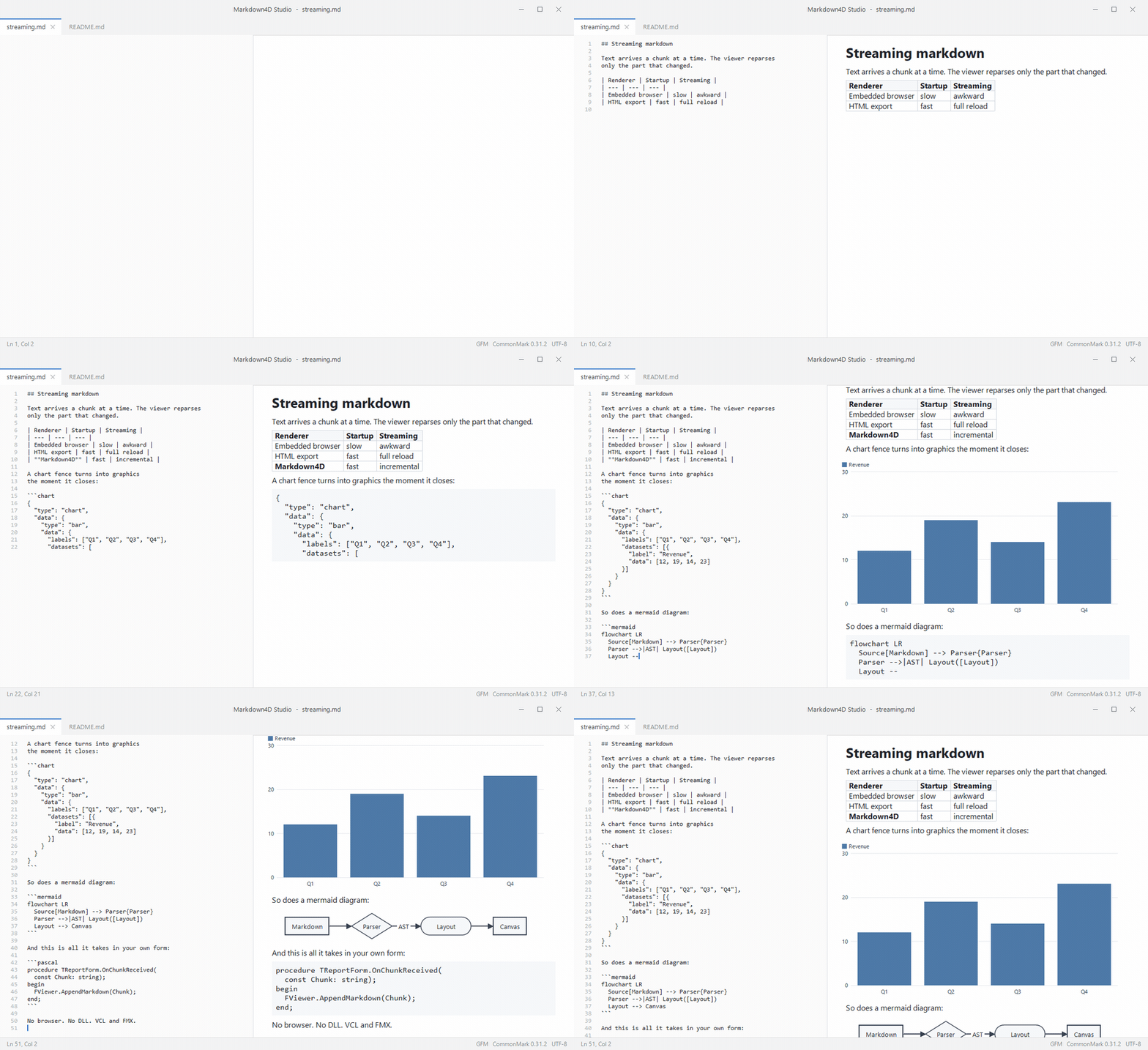
Chart4D came out of the same work and is public as well: github.com/GDKsoftware/Chart4D. Charts in editorial style for VCL and FireMonkey, the kind you can put in a report without apologising for them. The style is borrowed from the charts of the BBC: a bold title on the left, a light horizontal grid, labels right next to the data and a footer with the source. You supply the data and the words; the layout is already there, and you can override every part of it.
uses
  Chart4D.Types,
  Chart4D.Style,
  Chart4D.VCL;

var Chart := TChart4D.Create(Self);
Chart.Parent := Self;
Chart.Align := alClient;

Chart.Plot.Kind := TChartKind.Bar;
Chart.Plot.Orientation := TChartOrientation.Horizontal;
Chart.Plot.Title := 'Almost everyone is online';
Chart.Plot.Subtitle := 'Share of the population using the internet, 2020';
Chart.Plot.Source := 'Source: World Bank';
Chart.Plot.Categories := ['Sweden', 'Spain', 'Belgium', 'Netherlands'];
Chart.Plot.AddSeries('2020', [94.5, 93.2, 91.5, 91.3]);

Chart.SaveToPng('online.png');
Thirteen kinds, from line and bar to dot plot, dumbbell and donut. The core knows nothing about VCL or FMX; the two controls are thin adapters over one renderer, so a chart is pixel for pixel the same on both frameworks. Swap Chart4D.VCL for Chart4D.FMX and nothing else changes. Chart4D is younger and smaller than Markdown4D, version 1.0.0, no design-time registration yet. This is the moment to tell us what you miss.
Markdown4D and Chart4D are MIT, free to use, commercially too.
github.com/GDKsoftware/Markdown4D github.com/GDKsoftware/Chart4D
If your company runs on them, we offer support and maintenance contracts with guaranteed response times, and sponsored development of what you need. Get in touch via gdksoftware.com/contact-us or open an issue. We would like to hear what you build with it.
The Markdown4D library was built with the help of Claude Code, where we used the extensive scaffolding and guidelines we developed as a toolset within GDK Software. Without all the tools, with just Claude Code, the code does not meet the requirements we set for ourselves, and there would never have been a full component. But with all the knowledge and the tools we developed, this library came about without too much human effort.
If you want to be able to develop this yourself too, or if you want to use this knowledge to extend your own applications faster and better, we have developed a training to pass this knowledge on.
The training Claude Code for Delphi is a one day training for a maximum of twenty participants. We explain how we work with AI at GDK Software, and you get all the tools and skills to take with you, tuned to your own codebase. If you want to be there, you can. The following days are planned:
Programme and registration: training.gdksoftware.com.


Written by Marco Geuze
Director
Contact
GDK Software NL
(+31) 78 750 1661GDK Software UK
(+44) 20 3355 4470