
How long is your CLAUDE.md by now? And how many of those rules does Claude Code still actually follow?
Claude Code offers several options and levels for recording rules and instructions. But how do you set this up so that it works effectively and reliably? Perhaps you have a lot in your CLAUDE.md right now and you are discovering skills. Perhaps you are already a bit further along. Still, the question remains: what goes where? In this article I go through the places where you can put instructions, and how and when Claude Code uses them.
A good setup helps Claude get to the right place in the code faster and do the right things there. Because there is less searching and guessing, the process takes less time and less context. Without targeted instructions, Claude often needs quite a few grep and read actions to find the right files. Your setup also lets you enforce that certain scripts or actions are run. That is reason enough to take another critical look at your setup.
There are five ways to give Claude instructions or to enforce things. They are:
The best known is CLAUDE.md, the file that is loaded at the start of every session. Skills are instructions that are loaded based on their description. Until then, their content is unknown. Hooks respond to events, and agents are useful for specific tasks.
Rules are less well known. They were introduced as an addition to CLAUDE.md. In .claude/rules you can freely create Markdown files, in your own folder structure. This lets you split instructions by topic, and larger teams can manage them separately.
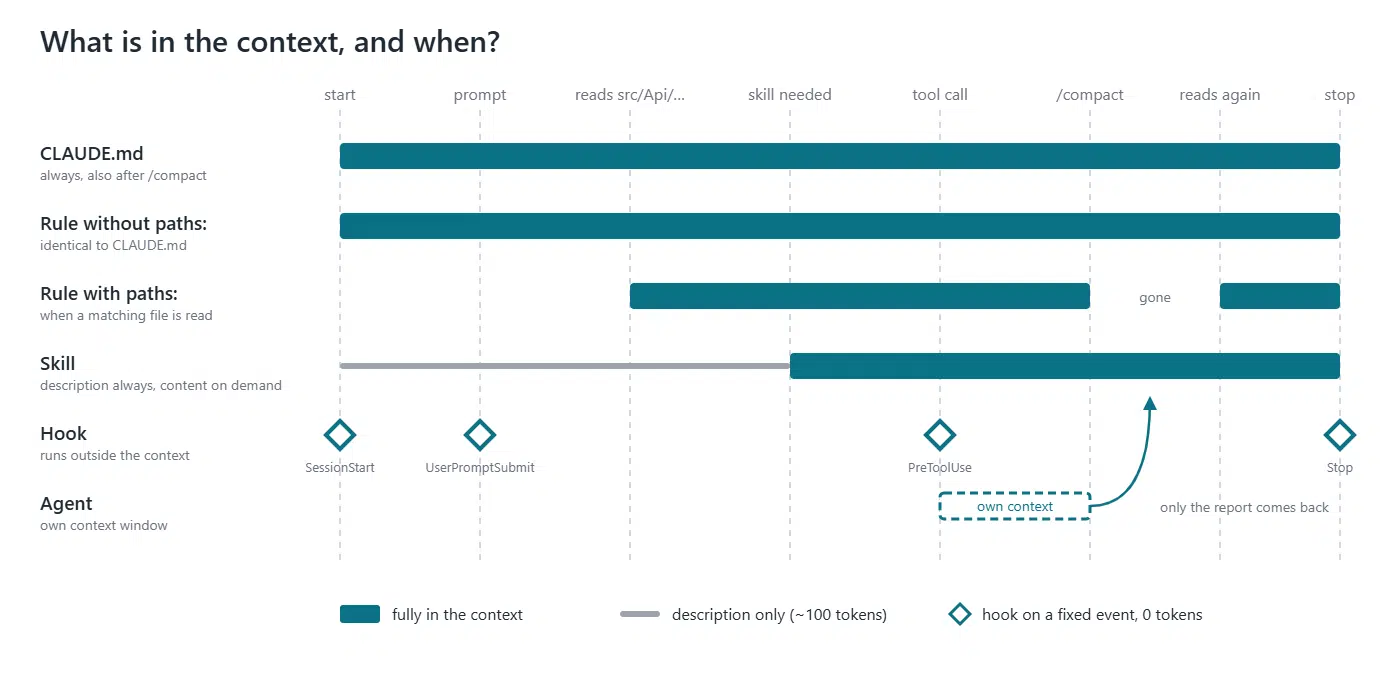
A rule can also be set up so that it is only loaded for a certain folder, file name or file extension. To do this, you put the YAML key paths: at the top of the rule with a pattern, for example src/api/** or **/*.dfm. The rule is then only loaded once Claude reads a file that matches that pattern. Without this paths key, however, the files work exactly the same as CLAUDE.md.
Mods are also new (since October 2026). I group them with hooks here, because that is what they resemble most. The big difference is that a mod embeds itself in the Claude software, so to speak. A mod also has more possibilities than a hook. A separate article about this will follow.
Four questions quickly tell you which option suits your goal best. They are the following:
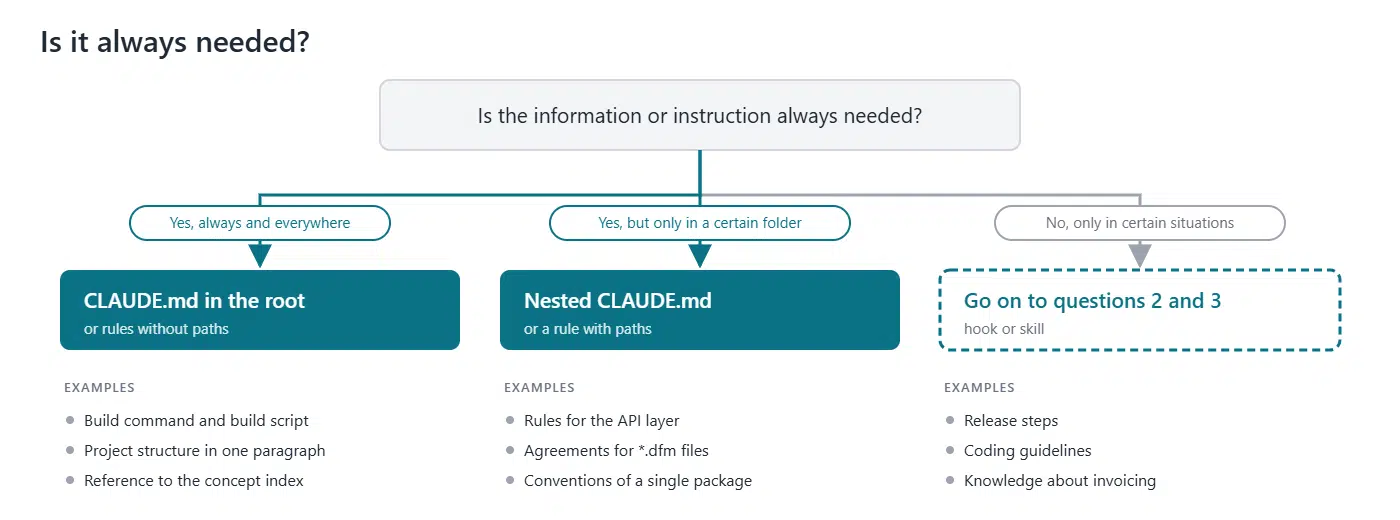
This is your first question, and think about it carefully. Maybe the instruction is always needed when coding, but not at all when analysing or investigating. Maybe it only applies to certain file types or to certain modules in the application.
You can have the following answers to this question:
The question here is whether you can pin what you want to achieve to specific moments in your work process. These are moments that do not depend on Claude’s own reasoning or thinking. For example: every time a certain file is changed, when an agent is started or when a session begins. In other words, can this moment be linked to one of the events available for a Claude hook?
And you can do more with these events than it may seem at first sight. In a hook you can set up or check various things. For example, there is no event for a git push. However, you can use the PreToolUse event to check whether a Bash command contains a git push.
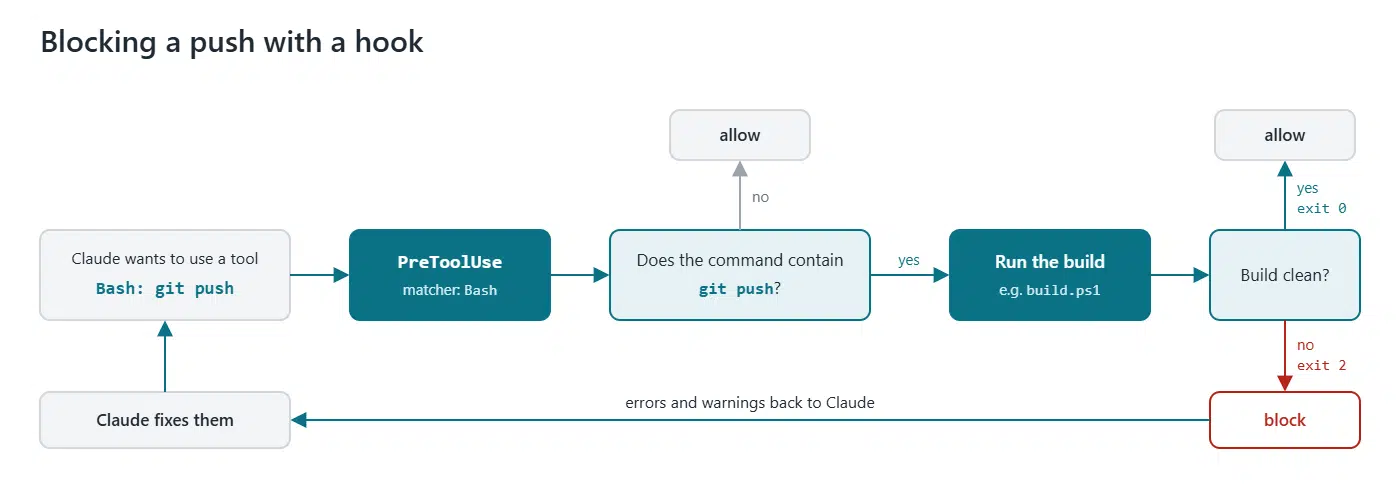
A hook is the only option that you know for certain will run on the specified event. That is not the case with any of the other options. With those, whether the instruction is carried out, or a skill or agent is applied, still depends on Claude.
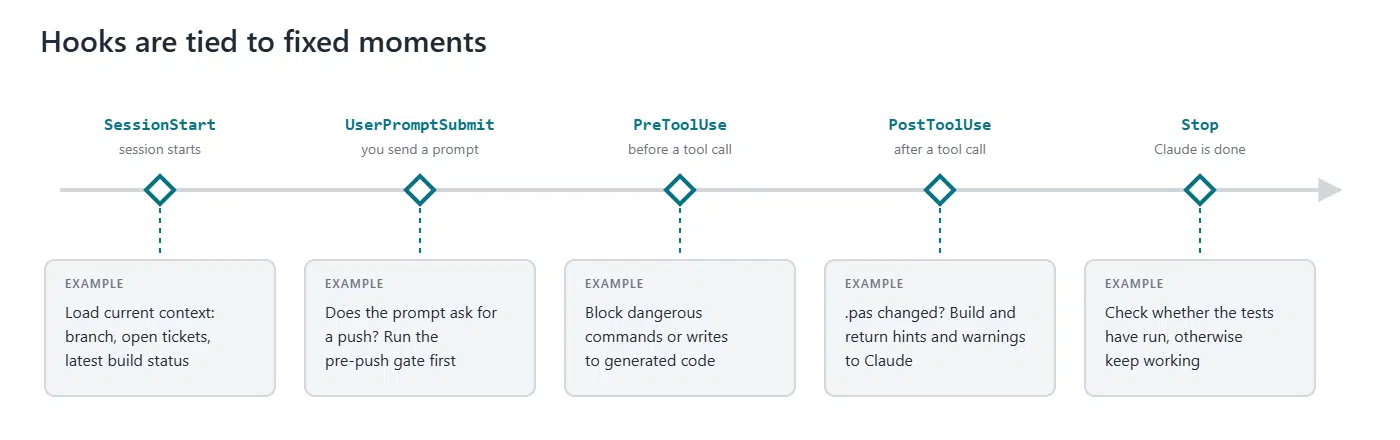
At the moment, a hook can carry out five different actions.
We have already answered whether something must always happen, or at fixed and recognisable moments. The question now is whether situations can arise where it is useful for Claude to see for itself that more information is available, and to read it only at that moment.
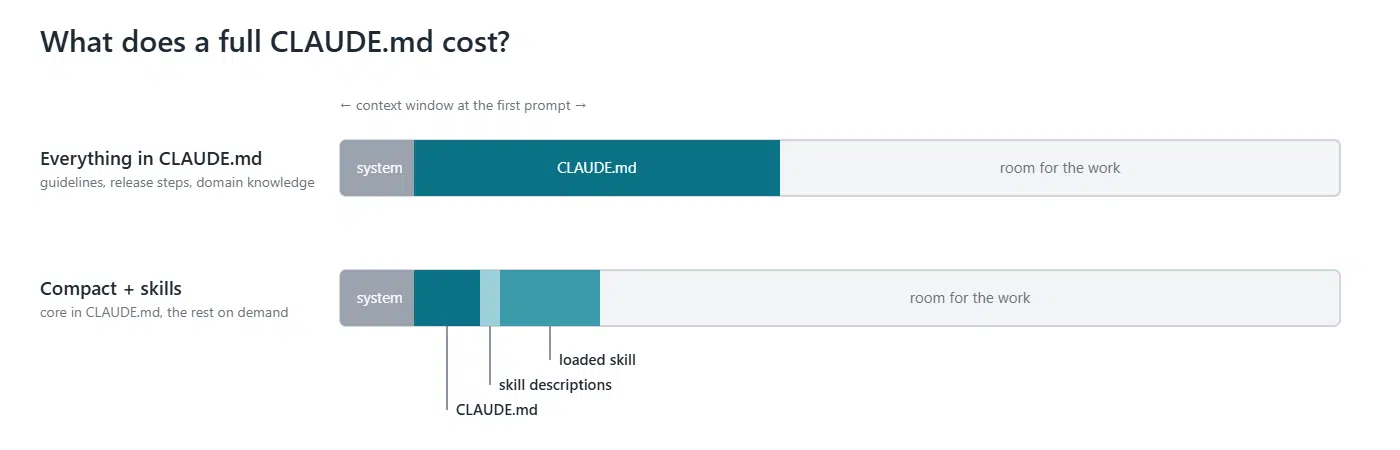
A very simple example is coding guidelines. They are not always needed, and they do not fit in CLAUDE.md because you want to keep that compact. They only need to be read and applied when coding.
Another example could be a step-by-step plan for creating a release, or instructions for a commit. Another use is guiding documentation about the code, organised by certain features or topics. For example, when something needs to be done for invoicing. Information can then become available that describes what is in which files and what needs special attention. This is information that does not need to be available in general, but that cannot be linked to fixed moments either.
Skills are extremely well suited to these uses. Each skill has its own description. Claude knows the skills and their descriptions. Based on these, Claude decides to use a skill during a session. If you ask for a commit in your session, the commit skill is triggered. If you want to extend the invoicing, the invoicing skill is triggered automatically. And not only for coding, but also for making plans or investigating something.
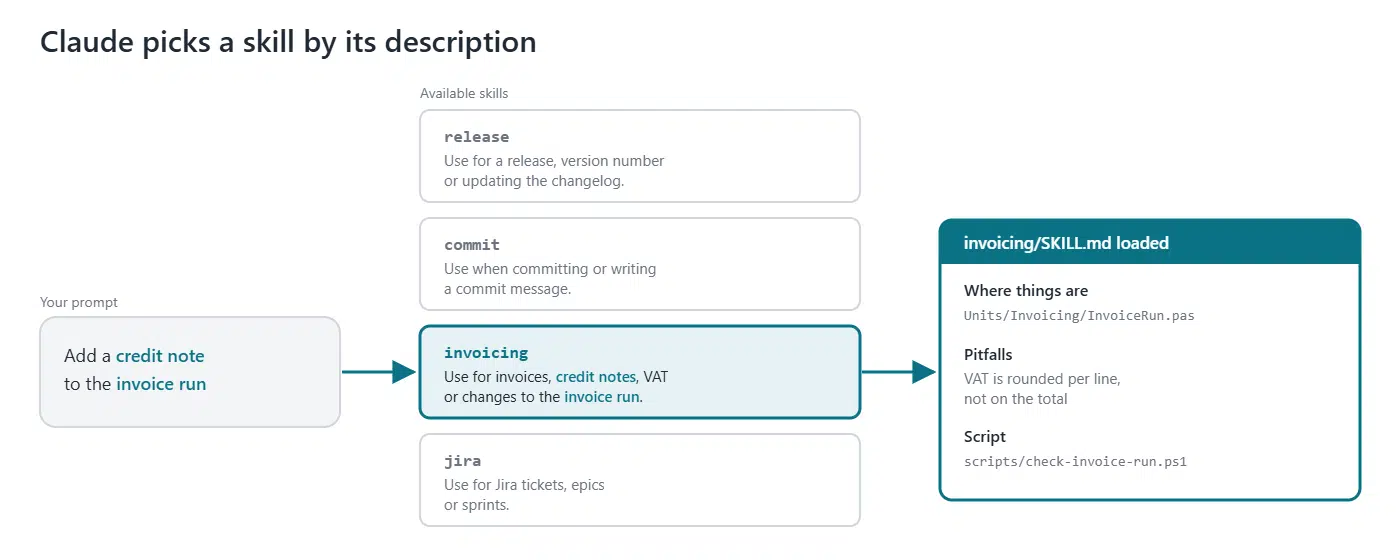
When defining a skill, pay attention to the following:
disable-model-invocation: true you prevent the model from starting the skill by itself.When you work in a Claude session, the whole context is often important. The steps taken in the session, including those by the model, enrich the context and help to reach the right result. Sometimes, however, that is not the case. Then the extra context only leads to clutter, or it is simply not relevant. In such cases you use an agent, either yourself or automatically through its description.
Take the build process, for example. For the main session, the only things that matter are whether it succeeded and what the hints and warnings are. Or say you want to know in which files a certain term is used. All the grep commands are not very relevant; only the list of files and line numbers is.
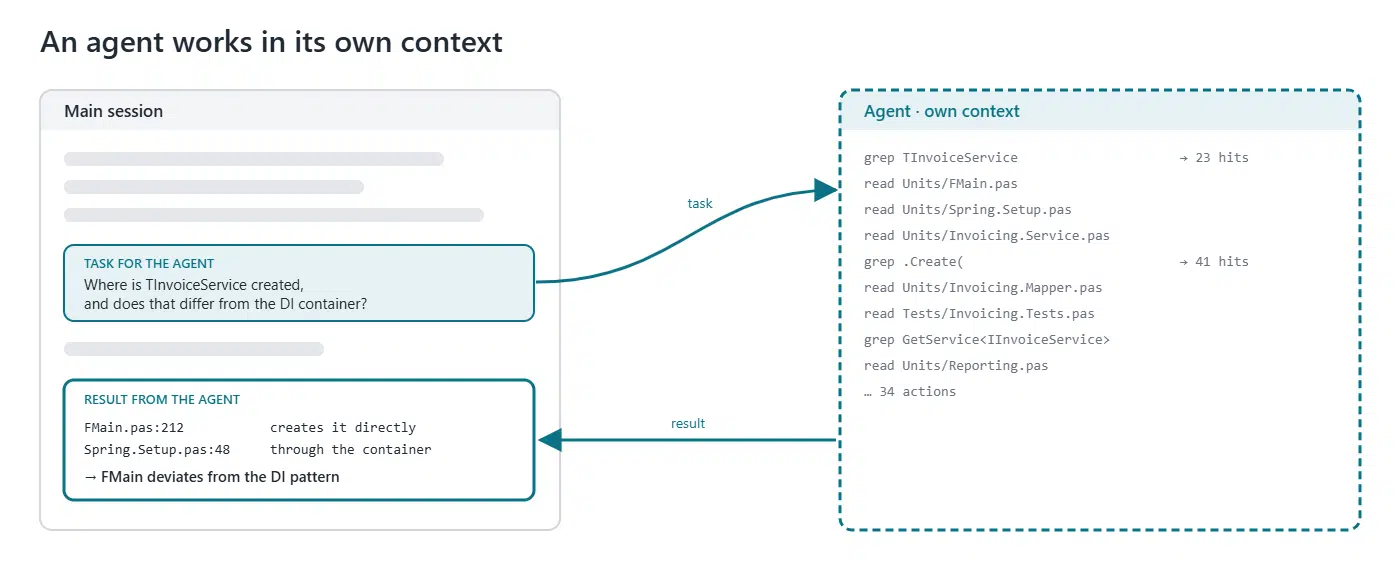
An agent can also be used to work in parallel, or because you want to use a different model. For example, Haiku for simple searches.
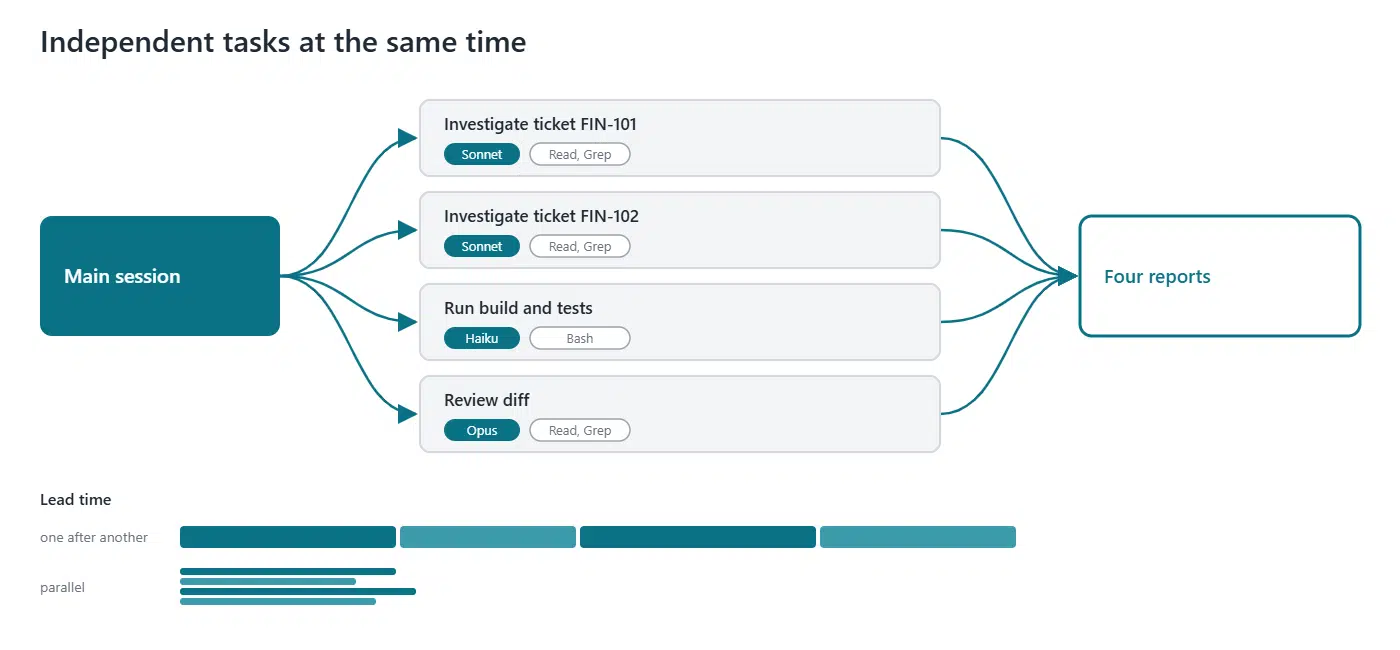
When defining an agent, pay attention to the following:
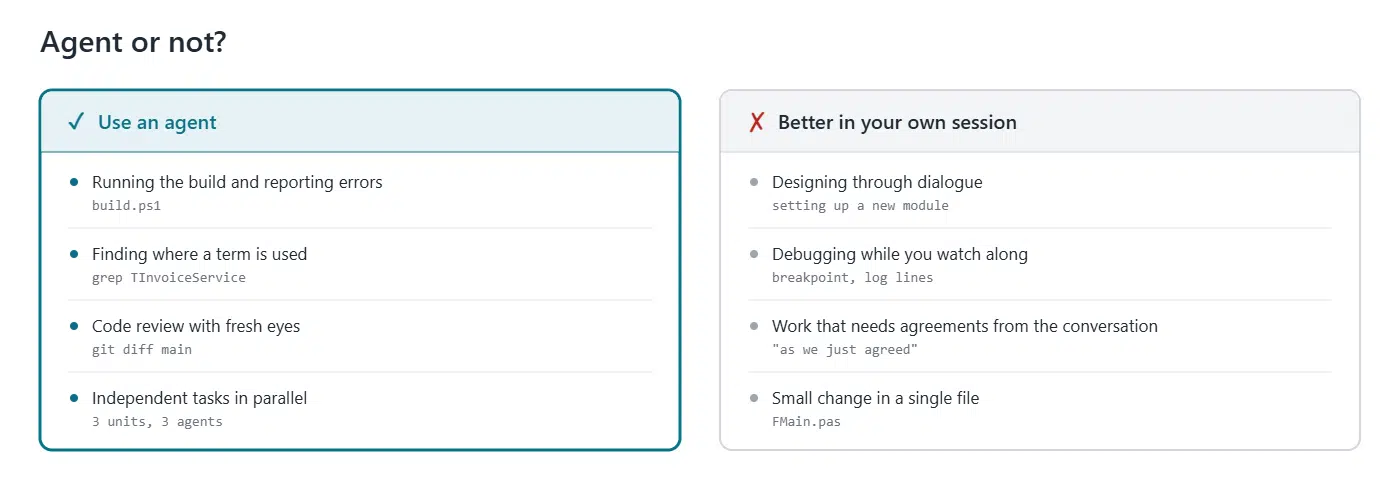
An agent is not always the best choice. It starts without the knowledge from your conversation, and in total it uses more tokens than if you do the work yourself in your session. So keep work that needs a lot of back and forth or shared context in your own session.
What matters is when something is loaded into the context or activated. The image below summarises this.
For CLAUDE.md, there are several places where you can have one. Note: they are not loaded instead of each other, but alongside each other. Organisation, user and project load at the start, and a nested CLAUDE.md loads as soon as Claude reads in that folder. If they contradict each other, you do not know which instruction Claude will follow. So avoid conflicting instructions.
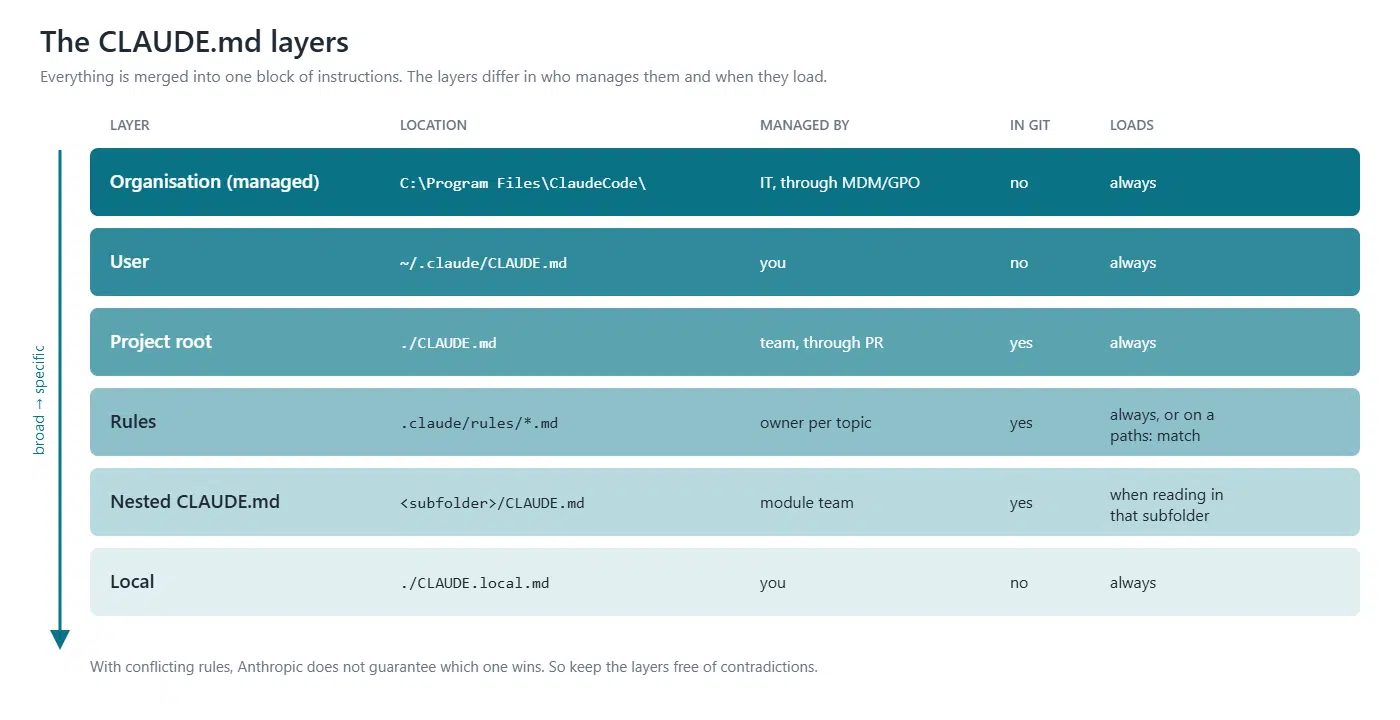
If you work with several people in a team or company, it is good to think about how to organise the various CLAUDE.md files, skills, hooks and all the other options.
One thing you can use is your own marketplace with your own plugins. Plugins can contain skills, hooks and agents. You can connect a marketplace to Claude Code locally through a local folder, or directly to a git repository. If it is in a git repo, you can also set up the marketplace in your organisation so that it is automatically available in Cowork (both the desktop and the web version).
This way you can share things that apply across all projects. Coding guidelines are a good example. Unfortunately, one thing cannot be done through a plugin (yet): CLAUDE.md and rules.
Regularly ask Claude to reflect at the end of a session. Where did instructions get in the way, where were they missing, did the agent do its job correctly, and what can be optimised?
Maintenance, both adding and removing, does not happen by itself. Keep an eye on whether the options still work well. Be alert to your own behaviour. If you often type the same instruction, it may be time for a skill.
Above all, ask Claude itself to come up with proposals and to work them out. This often gives good results. Also share insights with colleagues, and inspire each other to keep improving the way you work with Claude.


Written by Kees de Kraker
Director
Contact
GDK Software NL
(+31) 78 750 1661GDK Software UK
(+44) 20 3355 4470